


Our recommendations on backlink analysis software tools
Link analysis has always been an integral part to search marketing efforts. As with all marketing, you need to benchmark where you are and what your competitors are doing in order to put the right work in place and also to track performance. Within the last two years this process has become easier with a wider range of tools now available to aid you.
Search specialists will definitely know all of these and many more, but this list is aimed more at client-side marketers who want to benchmark their link quality against competitors, review SEO agency performance and spot opportunities for partnering with other sites, for example blogger outreach.
Increasingly, there is overlap with monitoring online PR tools which record mentions across the web - for these see our compilation of 36 reputation management services.
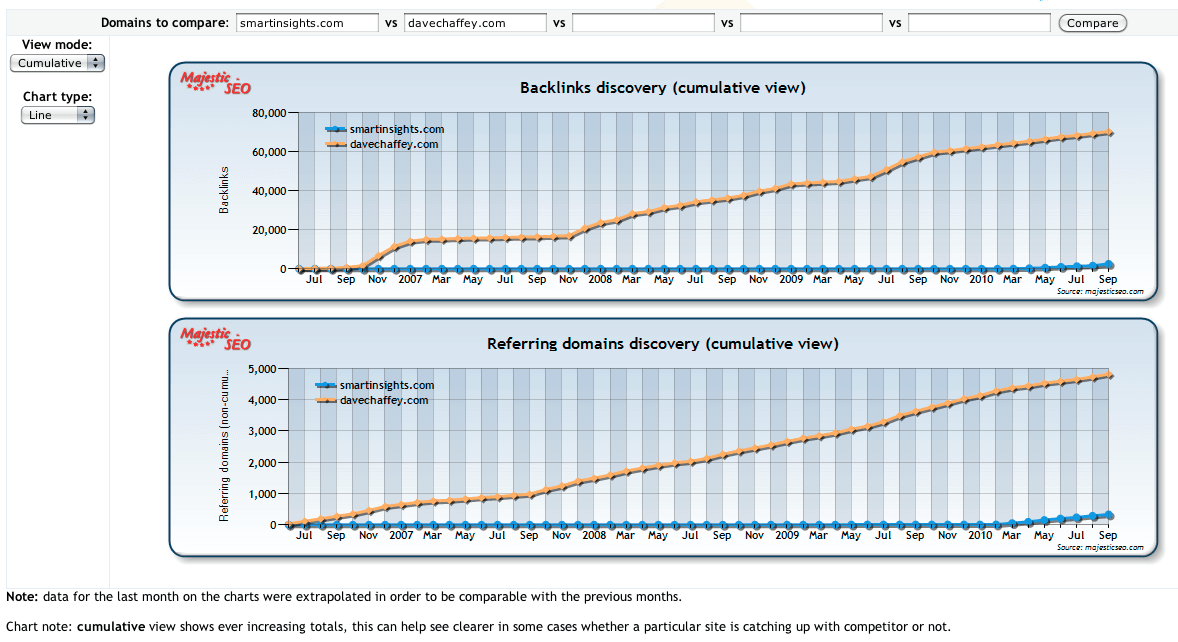
We think Majestic SEO is particularly useful for top-level benchmarking. The paid service gives more detail on the links, but thefree backlink history analysis report below compares competitor activity at the top level. Here we’re comparing our recently launched site with the established DaveChaffey.com. It shows linkbuilding is a long-term play rewarded by a sound content strategy! If you use this tool, we recommend the cumulative view and focusing on the unique referring domains as explained below. We did an interview with Dixon Jones of Majestic SEO a year ago which reviews how to choose a tool and linkbuilding process.
Link analysis should be done before any link building campaigns are started. You should understand:
- How many links you have. When benchmarking it’s most useful to review individual sites (known as unique referring domains) linking to you rather than total links, since you may have many links from one site (a link repeated across the whole site)
- The quality & related anchor text of the links (this could show some good wins in link reconfiguration)
- How you compare to your competitors in terms of number, quality & anchor text
- You should also have a good understanding of any quality links your competitors have and you don’t (Usually creates an obvious starting point)
Below we have recommend 6 tools available to you for competitive link analysis work. All allow you to review your own links and competitor links. We haven’t included Google Webmaster Tools because it only provides link information for your own site and isn’t totally comprehensive. If you do use it, we recommend the Yoast Firefox plugin which overlays PageRank information. We also haven’t included the Yahoo! Site Explorer which is an established tool, but likely to disappear with the Microsoft alliance. It’s also been superseded by the Open Site Explorer which gives additional info on anchor text and nofollowed links (where link equity isn’t passed from one site to another, for example in a blog comment or social network link).
1. Google link: Advanced search syntax
Site address: www.google.co.uk
Overview: It may seem an obvious place to start, but using the following command in Google will allow you to get a snapshot of external links for any given web address. Once at a Google search page type link:www.EXAMPLE.com. You can use tools like the SEO for FireFox plugin to export results into an Excel file. We also start here since some folks we speak to still think this gives a comprehensive listing, but rather it is a sample because Google has decided. We’ve found the sample has bigger than it used to be. for example, although Smart Insights is new in 2010, we have already amassed a fair few links – see :http://www.google.co.uk/search?q=link:smartinsights.com+-site:smartinsights.com. In this example we use -site to remove links from our own site.
Pros:
- Free
- Quick
- Simple
Cons:
- Only shows a tiny segment of links
- Requires plugins to export & pull together
- Doesn’t provide link quality data (Page Rank for example)
2. Open Site Explorer
Site address: www.opensiteexplorer.org
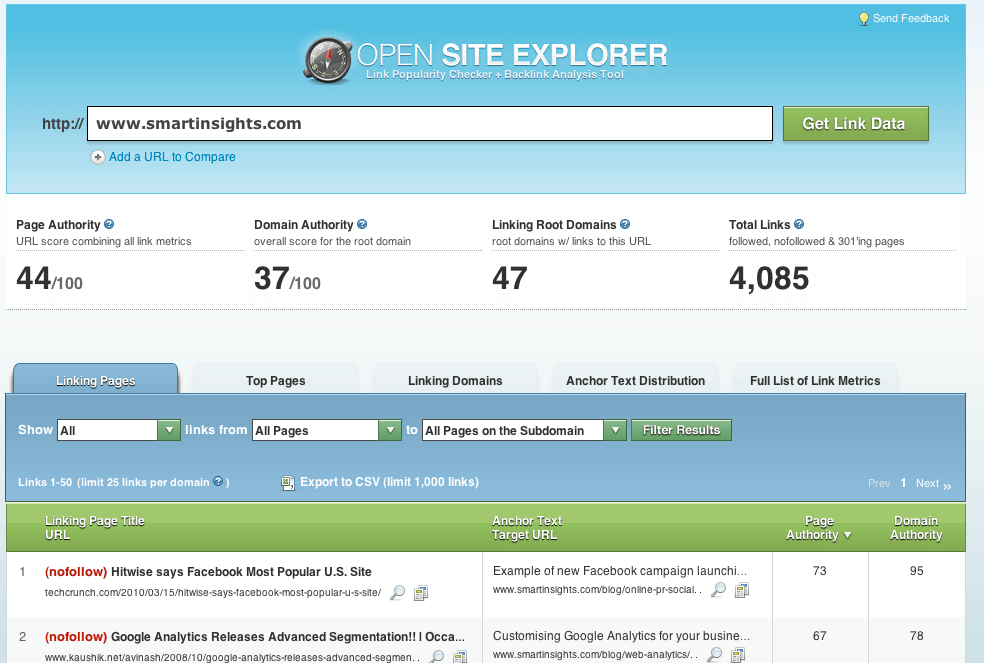
Overview: With the demise of Yahoo Site Explorer imminent the rise of this new in 2010 tool is hardly surprising. Giving access to very useful data with just a free login this tool is a great place to start with link analysis (total number of links limited). Powered by SEOmoz this tool should be in all hands-on online marketers favourites.
Pros:
- Free (though paid options available for more links and functionality)
- Quick
- Simple
- Allows comparisons to other sites through domain authority benchmar.
- Easy to use scoring tools which make comparisons & benchmarking simple
- Anchor Text analysis available
- Export to excel functionality built in
- Ability to drill down into links to specific pages
Cons:
- Analysis beyond first 1,000 links requires payment
- Cannot track links over time vs competitors to track your progress
3. Majestic SEO
Site address: www.magesticseo.com
Overview: Quite a well known tool in SEO, Majestic SEO gives incredibly detailed analysis on links. It prides its self on the size of its index and the its ability to turn this index into useful reports.
Pros:
- Free (though paid options available for more functionality)
- Quick
- Allows comparisons to other sites
- Allows you to trend external links over time
- Anchor Text analysis available
- Export to excel functionality built in
- Ability to drill down into links to specific pages
- Allows both a back link & domain link counts
- Separates EDU & GOV links to allow easy analysis on quality links
Cons:
- Not a sophisticated interface, requires practice
- Analysis beyond first 1,000 links requires payment / subscription
4. Link Diagnosis
Site address: www.linkdiagnosis.com
Overview: While an easier to use interface linkdiagnosis.com makes it frustratingly difficult to get started as it is locked down to Firefox and you have to install a plugin just to view reports.
Pros:
- Free (though paid options available for more functionality)
- Quick
- Anchor Text analysis available
- Visibility on nofollow links
- Export to excel functionality built in
- Ability to drill down into links to specific pages
Cons:
- Slow
- Only works in FireFox
- You have to download a plugin to see reports
5. Advanced Link Manager
Site address: www.advancedlinkmanager.com
Overview: A tool created by the same team behind Advanced Web Ranking which is a popular keyword rank tracking tool this software which is available for PC & Mac is a great addition to their portfolio. It does however do a lot more than link analysis, it often promotes it ability to “automate” link building, it can be configured to source websites, get their contact details & send automatic link requests to websites. Not something I would recommend.
Pros:
- Ability to track link-building progress over time
- Quick
- Anchor Text analysis available
- Ability to create custom reports & email / download
- Ability to drill down into links to specific pages
- Can be configure to run at certain intervals to keep everything up-to-date automatically
Cons:
- Cheapest version = $99
- Software only – Cannot be accessed by web browsers
- Tries to do too much
Using one of the tools above to help with your link analysis is definitely going to save you a lot of time. Remember when starting this work be clear what you want out of it, have objectives set and where possible benchmark your current performance so you can track your progress.
If you know of any other tools that we should have included above please let us know and we will take a look.


