



About Strategizer
 Wordtracker's keyword toolset has long been popular for finding additional, longer tail keywords to apply to your search or PPC campaigns. Strategizer integrates with Google Analytics to incorporate your current keywords into the Strategizer tool to help you analyze groups of related keywords to determine how viable those groups are to your campaign.
Wordtracker takes the view that you should not be focusing on a single keyword, but rather "keyword niches". In the example on their site they use donuts. Essentially it's presented as
- The single search term in the areas the marketer sells to is 2,400 per month
- The expected click through rate is 8% as they were ranked in position 3, totaling 192 visitors per month
- Conversion rate was pegged at 4% so the expected sales numbers would be about 8 sales a month
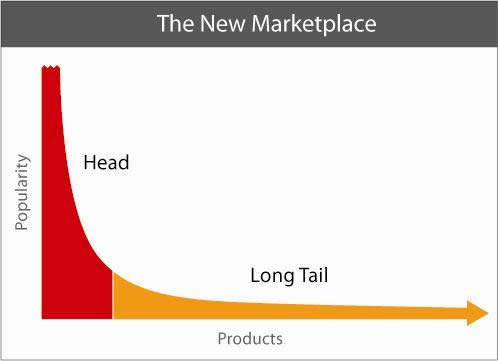 In theory this makes sense but in some markets you can compete with less difficulty if you own the exact match domain and can scale the marketing, content, and link building with degrees of success. There are other ways to compete as well so while there is great wisdom in paying attention to the long tail of a main keyword there are some other factors to consider as well.
The most actionable keyword research data you can get generally comes from your analytics program. So a tool which can integrate with your current analytics program and expand on your profitable (or help you find more profitable) keywords is a definite win. While there can be some concern about using Google Analytics on your site (giving Google your data and such) it's hard to argue how deep and powerful their analytics program is.
 A lot of spy tools provide "keyword value" estimates based on traffic and cost-per-click figures. While that is a good barometer of how valuable a keyword might be in the eyes of a search engine, keyword data specific to your site (which factors in real traffic numbers as well as conversions) is the best way to analyze your current site architecture for expansion or improvement.
A tool like Strategizer can be quite helpful in interpreting that data and providing additional keyword options based on the keywords found in your Google Analytics program. Furthermore, mining additional keywords which are found in niches that are already converting for you (with help from Wordtracker) is really quite a win because it's real data that is almost instantly actionable.
How Strategizer Works
You need to integrate your Google Analytics account with Strategizer for the tool to work. Once you do, you'll be given report options.Note that Wordtracker recommends having more than 20,000 non-paid search engine visits prior to processing that data (this can be a cumulative number met over months of data). In order for their niche set up and model to function correctly you do need a decent amount of data as the model is trend-based from a higher-level overview rather than a focus on individual keywords.
Here is the options page:
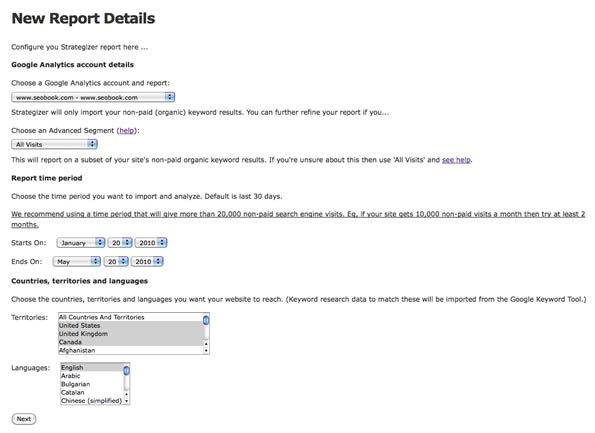 The time period and the country, territory, and language settings are self-explanatory. You also have the option to choose an "Advanced Segment" which can be:
- All Visits - defined as all non-paid search engine visits
- Default - segments in your Google Analytics account which Google has defined
- Custom - segments in your Google Analytics account which you have specifically defined
- Dynamic - segments which you can define as you create your Strategizer reports (this feature is not yet available)
A Strategizer Report
A Strategizer report groups your keyword in up to 2,000 niches. The initial report looks like this: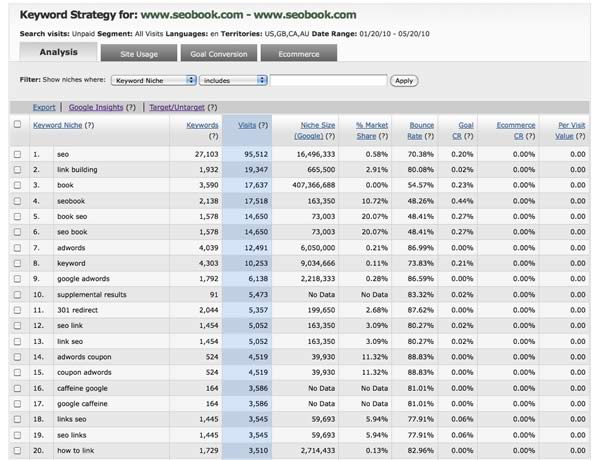 The data presented is pulled from your Google Analytics keyword report and grouped into niches by the Strategizer tool. Each keyword listed in the row is the perceived main keyword for the keyword niche and the keywords that fall under a niche classification include that main keyword as part of their phrase.
So what Strategizer does is take your exact match keywords from your Google Analytics account (the actual keyword used to produce a visitor) and convert them into broader reports (niches) for all keywords containing that exact keyword found in your analytics account.
Keyword Niche Analysis in Strategizer
Before getting into how the data is presented, understanding how niches work in Strategizer is pretty important as it is the basis of the analysis going on within the tool.The reports will not break niches down by individual keywords so having a firm grasp of how a niche is defined will help you understand and more efficiently use the tool.
*Note, a niche's name (link building in this case) is derived from an exact match keyword on your site. So in this case someone searched for link building and clicked on SeoBook.Com in the search results.
Strategizer sees the keywords that are bringing you traffic and uses that exact keyword, link building in our example, to set up a niche. Then, Strategizer pulls in broad match keywords for that keyword which brought you a visitor per Google Analytics (link building in this case) via the AdWords Keyword tool to populate the "Niche Size (Google)" Column.
To further illustrate this point, here's a look at the niche "link building":
For the niche of "link building" you are shown the following columns in the "Analysis" tab (we'll cover the other tabs in a bit):
- Keyword Niche - the niche defined by Strategizer via an exact match keyword in your Google Analytics program.
- Keywords - the number of keywords with the Niche Size (Google) data point that actually brought traffic to your site. So out of 665,000 searches done on broad matched variations of the keyword link building, we received at least 1 visit from 1,932 keywords.
- Visits - total number of visits from those 1,932 keywords.
- Niche Size (Google) - total number of searches, broad match based on the keyword that defines the niche (link building in this case) via the Google AdWords Keyword Tool.
- % Market Share - the percentage of searchers that end up as visitors on your site, compared to the total number of searchers out there for that niche (Visits/Niche Size).
- Bounce Rate - percentage of visits which left on the entrance page
- Goal CR - percentage of visits that resulted in the completion of a goal
- E-Commerce CR - percentage of visits which resulted in a e-commerce transaction
- Per Visit Value - defined as revenue/visits
- link building training
- how to do link building
- cheap link building
- link building training program
- link building tools
- link building majestic seo
- and so on...
A keyword niche is set up by an exact match keyword found in your Google Analytics report. The keywords that make up the niche are broad match keywords pulled in from the AdWords Keyword Tool
Additional Strategizer Reporting Options
Strategizer gives you 4 tabs to work with:- Analysis
- Site Usage
- Goal Conversion
- E-commerce
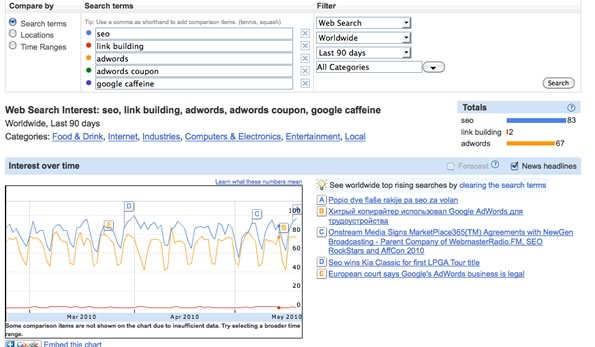
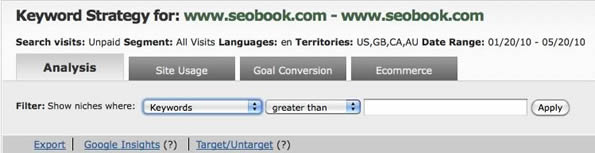 You can also select up to 5 keywords and link through to Google Insights:
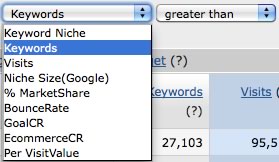
 You have the following filter options (all are "greater than or less than" except for "Keyword Niche". In "Keyword Niche" you can choose to include, exclude certain keywords or just work with the one's you've targeted by checking them off).
 We went over the Analysis tab earlier in the post when discussing the link building niche. The other tabs, which have a few unique metrics, are as follows:
- Site Usage
- Goal Conversion
- E-commerce
Site Usage
The Site Usage tab includes a few other metrics not included in the Analysis tab and removes some data points which are not relevant to the actual usage of your site: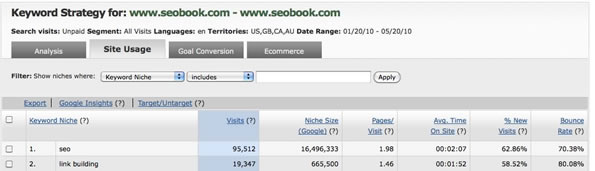 The new data points are:
- Pages/Visit - average number of pages viewed during a visit to your site. Repeated views of a single page are counted.
- Avg Time on Site - average time spent on your site over the visits within that keyword niche
- % of New Visits - percentage of visits by people who have never visited the site before
Goal Conversion
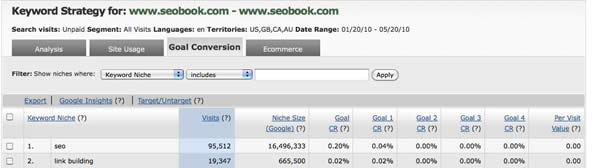 The Goal Conversion tab will show you the percentage of visits within your keyword niches which resulted in goals that you defined in your Google Analytics account.
E-commerce
The E-commerce tab does about exactly what you think it will do, gives you data specific to any e-commerce items you are tracking within your Google Analytics account. There are a couple of new data points here as well.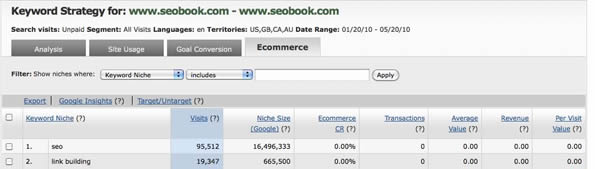 Strategizer will show you:
- E-commerce CR - percentage of visitors which resulted in an e-commerce transaction
- Transactions - total number of transactions completed
- Average Value - the average value of a visitor (factoring in transactions and overall visits)
- Revenue - revenue, including tax and shipping, from e-commerce transactions
- Per Visit Value - determined by dividing revenue by visits
Targeting Options
You may only want to investigate certain keywords niches at any given point so Strategizer gives you the option to target specific niches and makes it quite easy to remove targeting and re-apply it.So if you just want to look at a specific niche topic, take "links" for example, then you filter by niche name:
Click on the niche you want to target (highlights in green):
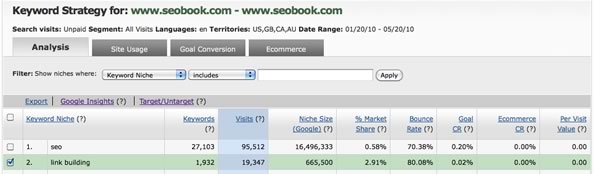 Then click the target button and set your filter to include niches that are targeted:
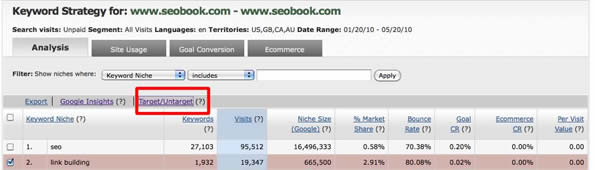 Pick the ones you want to target (highlighted in green) then click Target/Untarget (the targeted choices change to red):
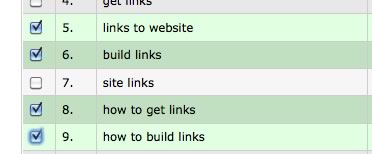 Then you have the ones you want to evaluate:
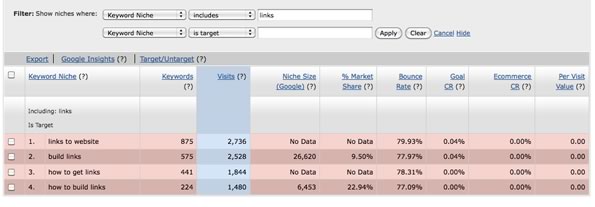 The sorting and filtering options are quite deep which is much needed given the vast amount of data you are given to work with.
Strategizer Wrap Up
As you can see there are lots of data points to play with inside of Strategizer. Since the data is pulling right from your Google Analytics account you know that the conversion data and value data are both fairly accurate.The sorting options can help you get a good look at keyword sets which need further investigating as to why they may or may not be performing as well as other keyword sets across all the metrics in the Strategizer tool.
Due to the tremendous amount of data available it makes sense to utilize the sorting options within the Strategizer toolset to help weed out keyword niches which are really low volume sets and could distort results. With great data comes great responsibility so it would be wise to play around with the filtering options within the tool to sort through results or metrics which might not be overly important to you.
Right now you can't drill down into specific keywords but that is a function Wordtracker is considering.
Is Strategizer Right for You?
I really like what Wordtracker is doing with this tool. Many times you might be working with tools which are just "estimates" and are usually not very accurate anyway. I would say this tool is a more than solid investment for:- Site owners with good amounts of traffic
- Site owners with defined goals and conversions in Google Analytics
- PPC folks who can mass identify strong (and weak) performing keyword sets to further investigate for their campaign structure
- Anyone who is serious about understanding their site and site architecture
- Someone who wants a higher level overview of how their site and site structure are performing across a variety of important metrics
- And any site owner who wants to understand as much as they can about their site, their site's engagement, and to identify areas for increased (or decreased) attention.


